Personal access tokens
A personal access token (PAT) is a long-lived bearer credential you mint to call the Kudos CRM REST API from your own code — a script, a nightly job, an internal integration — in place of an interactive browser session.
A PAT is not the same credential as a producer Bearer SyncApiKey (see
Bearer keys). A PAT (pat_…) authenticates you against the
CRM's own REST API. A SyncApiKey (sak_…) authenticates the CRM against your
product's pull channel. Different direction, different token. If you are
connecting your own tools to your CRM data, you want a PAT.
Token lifecycle
- Mint
Create the token with the scopes you need. The raw
pat_…secret is shown once. - Store
Save it in your secret manager. It is never retrievable again.
- Use
Send it as
Authorization: Bearer pat_…on every REST API request. - Revoke
Delete the token when it's no longer needed, or if it may have leaked. Revocation is immediate and permanent.
Mint a token
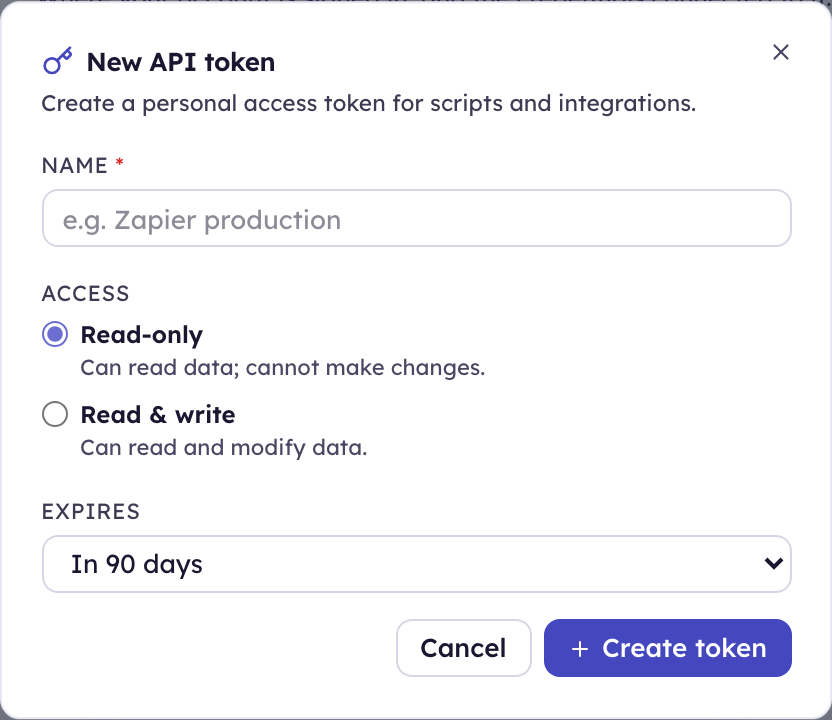
Create tokens in Settings → Security → Personal access tokens, or over the API:
curl -X POST https://api.kudoscrm.com/api/v1/api_tokens \
  -H "Authorization: Bearer <your-session-or-existing-pat>" \
  -H "Content-Type: application/json" \
  -H "Idempotency-Key: $(uuidgen)" \
  -d '{ "data": { "attributes": {
    "name": "nightly-export",
    "scopes": ["read:contacts", "read:deals"],
    "expires_in_days": 90
  } } }'
The raw token is returned once, in meta.token. It is never stored and
never returned again. If you lose it, revoke the token and mint a new one.
| Field | Required | Notes |
|---|---|---|
name | yes | Human label, ≤120 chars. Shown in the token list and audit log. |
scopes | yes | Array of scope strings (below). At least one. |
expires_in_days | no | Defaults to 90 days. A bounded lifetime means a leaked token eventually dies on its own. |
Idempotency-Key header | recommended | Makes a proxy-retried mint safe — a retry returns the original token record with meta.duplicate: true and no secret (it was shown on the first response). |
Bodies use the data.attributes envelope, like the rest of the write API. A
flat { "name": … } body is rejected with 400.
Scopes
A scope is a verb:resource string.
| Scope | Grants |
|---|---|
read:* | Read any resource |
read:contacts, read:deals, … | Read that resource |
write:* | Read and write any resource |
write:contacts, … | Read and write that resource |
The resource is the first path segment under /api/v1, and nested routes inherit
their parent — write:contacts covers /contacts/:id/tags too. write implies
read on the same resource. A token with no scopes can do nothing.
The read/write boundary is enforced for every token. A token whose scopes
all begin with read (or that has no scopes) is read-only: any
state-changing request (POST/PATCH/PUT/DELETE) is rejected.
Per-resource enforcement applies to app credentials. A
personal token is still checked only against the read/write boundary, so
read:contacts does not today stop it reading deals. That will change with
advance notice — scope your personal tokens accurately now and nothing breaks
when it does.
App credentials
A token can belong to a connected integration instead of to you personally.
- Register the integration
In Integrations → Sources, add the partner (a name and a producer key is enough). Over the API that's
POST /api/v1/ingest/sources:curl -X POST https://api.kudoscrm.com/api/v1/ingest/sources \-H "Authorization: Bearer pat_…" -H "Content-Type: application/json" \-d '{ "data": { "attributes": {"name": "Calilio", "producer": "calilio" } } }'The response carries
data.source_id—src_…. It also returns a one-time signingsecret, which is for the inbound webhook channel; ignore it unless that partner also pushes events to you. - Mint the credential against it
In Settings → Security → API tokens, choose the integration under Belongs to instead of leaving it as Me. Over the API, pass its id:
The integration's uuid and its public src_… id are both accepted:
curl -X POST https://api.kudoscrm.com/api/v1/api_tokens \
  -H "Authorization: Bearer pat_…" \
  -H "Content-Type: application/json" \
  -d '{ "data": { "attributes": {
        "name": "calilio",
        "integration_source_id": "src_…",
        "scopes": ["write:contacts", "write:activities"] } } }'
Prefer this for anything a third party operates:
| Personal token | App credential | |
|---|---|---|
| Owner | You | The workspace |
| Visible to | Only you | Anyone who can manage API tokens |
| Revoked by | You, or expiry | Also Disconnect on the integration |
| Survives your account being deactivated | No | Yes |
| Scopes | Read/write boundary | Enforced per resource |
It also inherits that integration's IP allowlist, if one is set, so the credential only works from your partner's egress addresses.
Because an app credential is owned by the workspace rather than by a person, it keeps working when the admin who created it is deactivated — offboarding someone shouldn't take a live integration down. Disconnecting the integration cuts its API access in the same click, with no separate revoke step to forget.
A suspended account or a suspended workspace still stops it immediately. Those are security actions rather than offboarding, so they err closed.
A scope rejection names exactly what is missing, so a 403 is debuggable without
being able to read the token back:
{ "errors": [ { "status": "403", "title": "Forbidden",
                "detail": "This API token is missing the `write:activities` scope." } ] }
Use a token
Send it as a bearer header on any REST API request:
curl https://api.kudoscrm.com/api/v1/contacts \
  -H "Authorization: Bearer pat_9f3c…"
The pat_ prefix lets the API tell your token apart from a session token without
a database round-trip. Bearer requests skip CSRF — they carry no session cookie.
List and revoke
| Method | Path | Use |
|---|---|---|
GET | /api/v1/api_tokens | List your own tokens (never the raw secret — only a 4-char hint). |
DELETE | /api/v1/api_tokens/:id | Revoke. Takes effect immediately. |
Tokens are scoped to your tenant and your user — you can never see or revoke another user's tokens. Revocation is permanent (never a hard delete), so an audit of "what could touch this tenant's data" stays complete. Minting and revoking are both logged as high-severity security events.
Rotate on suspicion, not on schedule beyond expiry: if a token may have leaked, revoke it and mint a replacement. There is no un-revoke.